

Storage for online business usually means two things at once, a place for physical inventory and a secure place for digital files. If you sell products online, manage remote staff, store equipment, or handle customer documents, the right setup is rarely one unit or one cloud account. It is a practical mix of space, access, security, and cost control.
Start by separating physical storage from digital storage
An online business can run out of room in two ways. The first is visible: boxes in a spare room, packing materials in a hallway, tools in a vehicle, or seasonal stock taking over an office. The second is less visible, but just as important: scattered product photos, invoices, supplier contracts, spreadsheets, design files, and customer records across laptops and email threads.
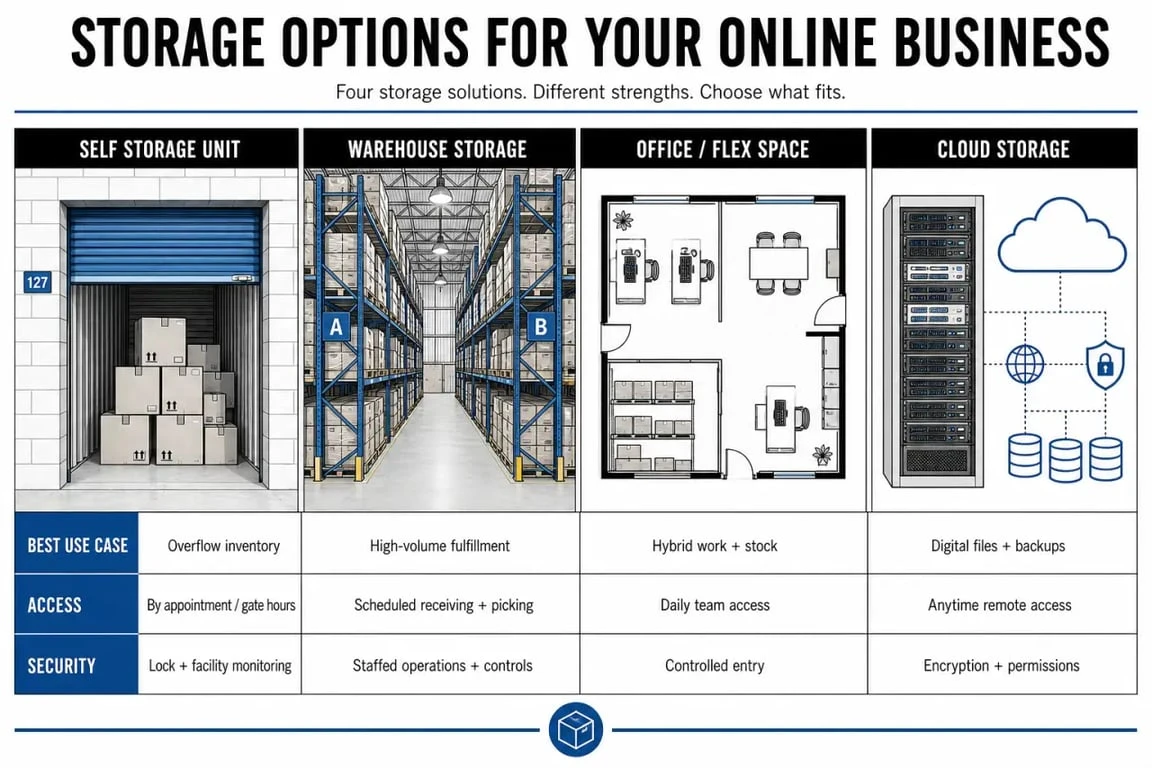
Physical storage solves the inventory and equipment problem. Cloud storage solves file access, collaboration, and backup. For many e-commerce businesses, using both is more efficient than trying to force one solution to do everything.
When physical storage is the priority
Choose physical storage when the main pressure is stock volume, bulky materials, returns, displays, samples, tools, documents, or packaging. A small seller may only need a compact unit for overflow inventory, while a growing operation may need warehouse storage, drive-up access, or loading areas that make regular movement easier.
Common unit references such as 5×5, 5×10, and 10×20 are useful starting points, but size should not be chosen from square footage alone. Think about how often items need to be picked, whether boxes must be stacked, and whether an aisle is needed inside the unit to reach fast-moving products without unloading everything.
When cloud storage is the priority
Cloud storage matters most when a team needs remote access, shared folders, secure file sharing, backup, and collaboration. It is especially useful for product listings, supplier documents, brand assets, financial files, customer service templates, and operational records.
Strong cloud storage for business should include encryption, two-factor authentication, version history, password-protected links, suspicious activity monitoring, ransomware detection, and virus scanning. No storage method is 100 percent secure, but these features reduce avoidable risk and make recovery easier if something goes wrong.
Compare the main storage options before you rent or subscribe
The best storage for online business depends on what needs to be moved, protected, accessed, or shared. A self storage unit may be perfect for stock overflow but useless for daily team file collaboration. A cloud platform may organize invoices beautifully but cannot hold 40 cartons of apparel. The comparison below helps narrow the choice.
| Storage option | Best for | Access and convenience | Security considerations |
|---|---|---|---|
| Self storage unit | Inventory, equipment, documents, packaging, samples | Useful when you need flexible space, drive-up access, or local pickup | Look for electronic gate access, video surveillance, and individually alarmed units where available |
| Warehouse storage | Larger stock volumes, bulk goods, growing e-commerce operations | Better for high-volume storage and frequent movement of goods | Check loading access, handling rules, insurance, and site controls |
| Office or flex space | Admin work, packing, meetings, light operations | Useful when storage and workspace must sit close together | Confirm what business activities are allowed on site |
| Cloud storage | Business files, images, contracts, backups, team collaboration | Accessible from different devices and locations | Prioritize encryption, two-factor authentication, version history, and recovery tools |
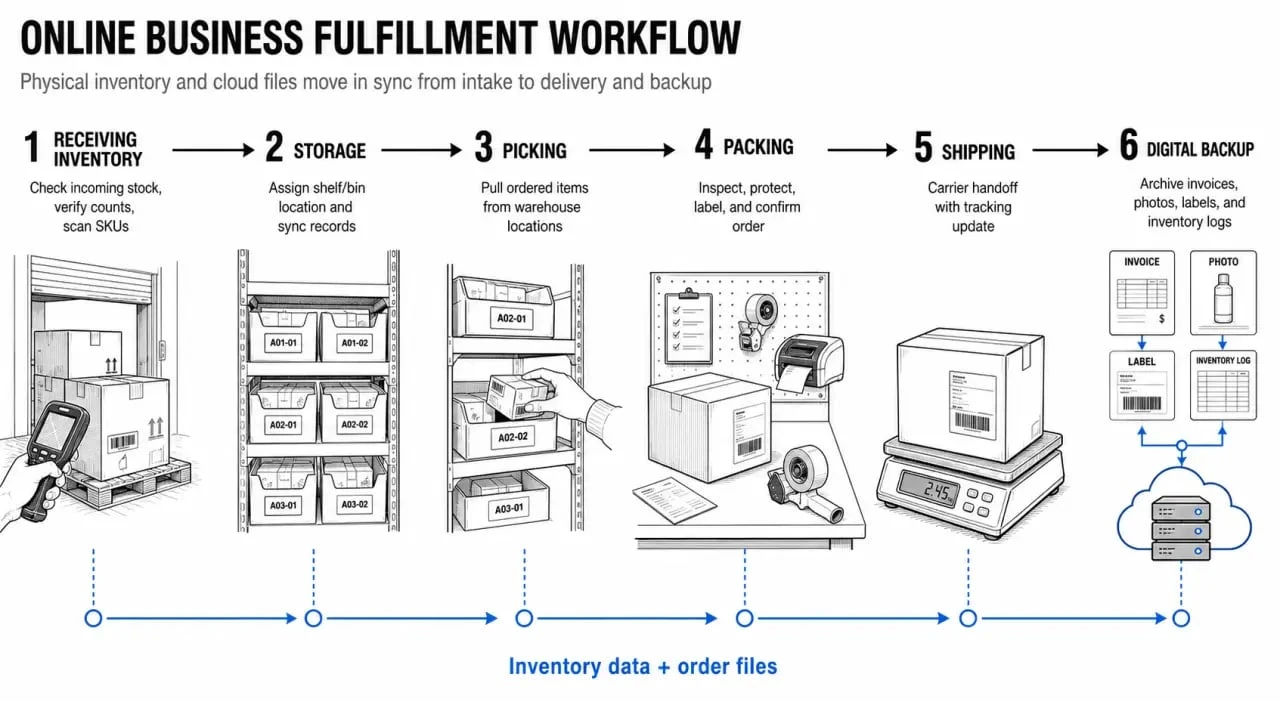
The right choice is usually not one box. It is a workflow. Products need to arrive, be stored, picked, packed, and shipped. Files need to be saved, shared, and backed up. If the unit is cheap but far away, transport time adds up. If the cloud folder is accessible but poorly organized, the team still wastes time searching for files. The strongest setup keeps products easy to reach and files easy to find.
Features that matter most for e-commerce storage
Online sellers should evaluate storage like part of the operating system, not just as empty space. The question is not only “Can it fit?” but also “Can it help work faster without creating new risks?”
Access, loading and delivery acceptance
Access rules affect day-to-day efficiency. Some businesses benefit from 24/7 gate access, especially if packing happens early in the morning or after regular work hours. Drive-up access makes loading and unloading simpler when cartons, tools, display materials, or marketplace returns move in and out often.
For larger deliveries, check whether the facility has wide-drive aisles and whether it can accommodate large vehicles, including 18-wheeler trucks where relevant. Package delivery acceptance can also be valuable if suppliers ship directly to the storage location, but the facility’s policies need to be clear before relying on it.
Climate control and product protection
Climate control is worth considering for temperature-sensitive inventory or materials that can be damaged by heat, cold, or humidity. This may include certain cosmetics, candles, electronics, paper goods, artwork, textiles, medical supplies, or staging materials. Even if products are not highly sensitive, consistent conditions can help protect packaging quality and reduce damage before sale.
Organization inside the unit
A storage unit becomes expensive when it turns into a search problem. Use labeled zones for bestsellers, slow-moving stock, returns, packaging, and documents. Keep a simple inventory sheet in cloud storage so the physical unit and digital records match. If products need frequent access, leave a walking aisle and avoid stacking fast-moving SKUs behind seasonal or low-priority items.
Which business types benefit most from storage?
E-commerce brands are the obvious users, but they are not the only online-first businesses that need storage. Any company that sells, stages, ships, repairs, consults, or documents work can benefit from separating operational clutter from the main workspace. Online sellers, service businesses, and remote teams all use storage in different ways.
FTC Cybersecurity Tips for Small Businesses · Practical guidance to help small businesses protect passwords, prevent brute-force attacks, and strengthen cybersecurity.
- Online sellers and marketplace businesses use storage for inventory, packaging, returns, seasonal stock, and promotional materials.
- Retailers with online channels keep overflow stock away from customer-facing areas while still supporting fulfillment.
- Contractors and home service businesses store tools, supplies, parts, and job materials between appointments.
- Realtors, home stagers and interior designers store furniture, decor, samples, lighting, and presentation materials.
- Remote teams and digital businesses rely more heavily on cloud storage for shared documents, creative assets, backups, and controlled file access.
- Pharmaceutical sales representatives and medical suppliers may need secure, organized, and sometimes temperature-aware storage for samples or materials, depending on product requirements.
The shared benefit is flexibility. Instead of expanding an office, leasing a larger workspace, or filling a home with stock, businesses can rent only the space they need and adjust as volume changes.
Can you run an online business from a storage unit?
You can use a storage unit to support an online business, but you should not assume you can operate the entire business from inside it. Storage facilities are typically designed for storing, loading, unloading, and accessing goods, not for running a retail counter, manufacturing products, hosting staff, or receiving customers.
Before renting, ask what business activities are allowed. Clarify whether deliveries can be received, how often the unit can be accessed, whether packing on site is permitted, and whether there are limits on vehicles, materials, or working time. If a place is needed to pack daily orders, meet clients, or manage admin tasks, office space or flex space may be more appropriate than a standard unit.
A practical decision rule
Choose physical storage when the business problem is space: stock, equipment, documents, packaging, samples, or returns. Choose cloud storage when the problem is access: files, backups, collaboration, approvals, and recovery. Choose both when an online business has real products and real digital workflows, which is the case for most growing e-commerce operations.
Before committing, list the weekly movements: what arrives, what must be stored, what must be picked, what must be packed, what must be uploaded, and what must be backed up. That workflow shows whether a 5×5 overflow unit, a 10×20 stock hub, warehouse storage, cloud collaboration tools, or a combination will work without creating clutter or risk.