
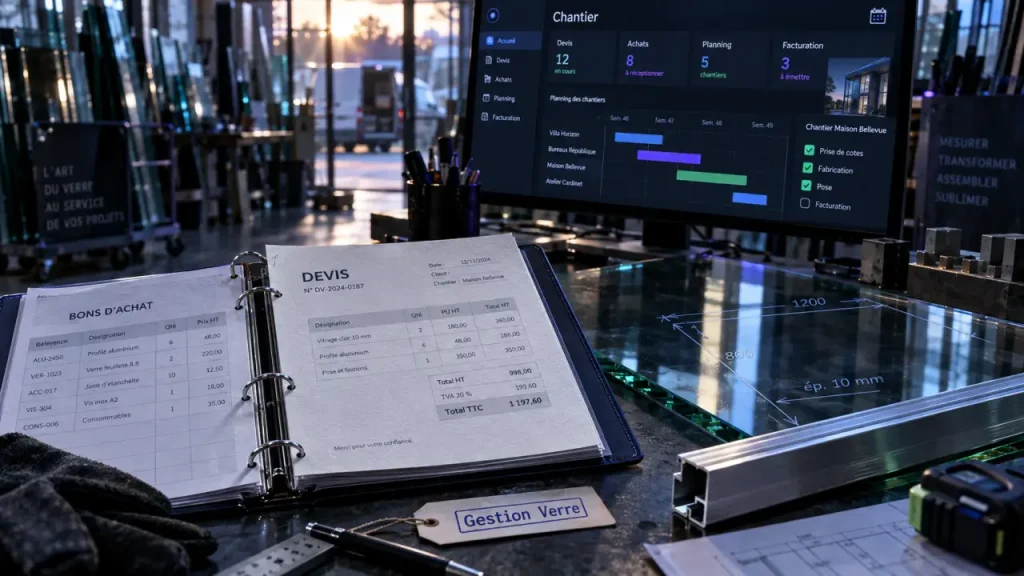
For a glass shop, glazing contractor, fabricator, or installer, winning the work is only the beginning. The real challenge is carrying accurate information from the first supplier price through purchasing, site updates, installation, invoicing, and payment. Glass business software brings these steps into one system, reducing dependence on spreadsheets, paper tickets, and disconnected apps where errors and margin leaks are difficult to spot.
What specialized glass business software should manage
Generic project tools can track tasks, but they rarely match the sequence of a glazing job. Specialized software is built around the people, materials, documents, and handoffs that move a project from estimate to cash. It gives office and field teams one job record instead of several versions of the same information.
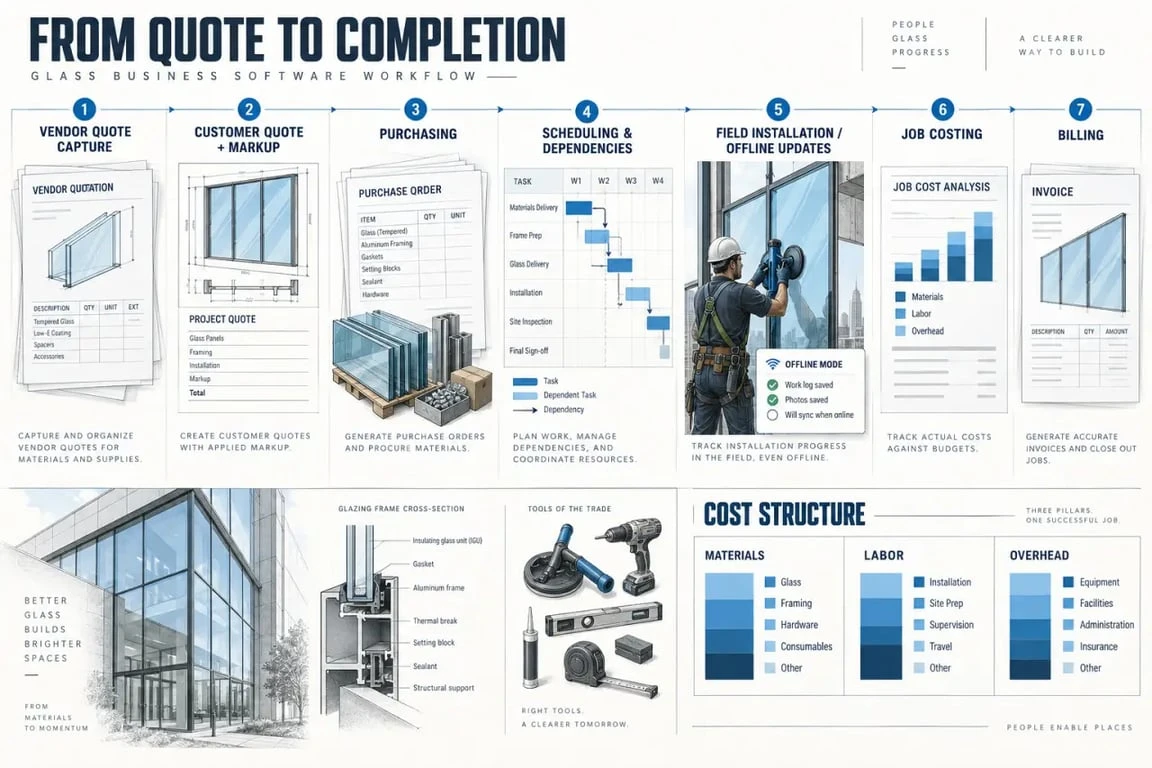
- Estimating and customer-ready quotes
- Scheduling, project timelines, milestones, and dependencies
- Purchasing and supplier quote management
- Field operations, installation updates, and job-detail access
- Labor, material, and overhead tracking for job costing
- Billing and a clear path from completed work to invoice
This approach serves commercial and residential glaziers alike. A small installer may need cleaner handoffs between the estimator and crew. A fabricator or larger glass contractor may need tighter coordination across purchasing, production, delivery, and multiple active sites. In both cases, the goal is the same: give every team member access to current job data.
Start with estimating, then protect the quote through purchasing
Convert vendor pricing into a quote the customer can approve
Quoting is where operational discipline begins. Glass business software can support a workflow in which a vendor quote is uploaded or captured, then converted into a customer-ready quote. The document can include the company’s markup, commercial terms, and branding, so staff do not have to retype supplier information into a separate template.
AI-powered quote generation is useful when supplier documents arrive in inconsistent formats or estimators need to respond quickly. It does not replace commercial judgment. The team still needs to confirm the scope, exclusions, quantities, lead times, and margin. The benefit is less repetitive transcription, giving the estimator more time to validate the job instead of moving line items between files.
Keep the approved scope connected to the buying decision
Once a quote is accepted, purchasing should not restart in a blank email thread. The purchase request should remain connected to the estimate, the selected material, and the target cost. This continuity makes it easier to see when the actual supplier cost differs from the original allowance and decide whether a change order, schedule revision, or margin review is needed.
One useful control comes from the logic of shears: a clean cut happens when two blades meet at the right point. In the same way, a purchase order should meet the approved quote at a precise line-item level. If a tempered panel, hardware set, sealant, or delivery charge is bought under a vague job description, the cost may reach the ledger without being assigned to the estimate it belongs to. Matching the scope, quantity, unit, and revision before ordering creates a clearer audit trail and helps prevent small substitutions from quietly reducing gross margin.
See job profitability before the final invoice
Profitability is not only a year-end reporting concern. It changes as material prices, labor time, site conditions, and overhead accumulate. Effective glass management software tracks these costs against the job so managers can review job costing while there is still time to respond.
| Cost area | What to capture | Why it matters |
|---|---|---|
| Materials | Quoted allowance, supplier cost, extras, and delivery charges | Shows whether procurement is consuming the planned margin |
| Labor | Estimated hours, actual field time, rework, and supervision | Shows whether installation productivity matches the estimate |
| Overhead | Allocated operating costs relevant to the job | Prevents a misleading view based only on direct materials and labor |
Profit visibility is useful because it turns a vague concern into a discussion about a specific job. If actual costs begin to outpace the estimate, the team can check whether the cause is a supplier change, an omitted item, an additional visit, a scheduling conflict, or work outside the original scope. The software does not create margin on its own, but it makes margin loss visible earlier.
Run installation work without losing the field team
Schedule dependencies, not just dates
Installation dates depend on more than calendar availability. Materials must be ordered and received, access must be confirmed, other trades may need to finish first, and the right crew, equipment, and documentation must be ready. Scheduling tools and Gantt charts make timelines and dependencies easier to follow across active jobs.
A useful schedule shows how events affect one another. If a delivery moves, the system should make the affected installation task visible instead of leaving coordinators to discover the conflict through calls and messages. This helps dispatchers make informed changes and gives project stakeholders a more reliable view of what is actually ready to install.
Make job details usable on site
Field operations work best when installers can access current job information where the work takes place. Mobile access can support job-detail viewing, progress reporting, and field updates without requiring the crew to return to the office. Offline capability also matters where connectivity is unreliable. Teams need a clear way to continue working and synchronize updates when a connection becomes available.
During a demonstration, ask exactly what field users can view, edit, and capture offline. Ask how updates are reconciled if a job changes while a crew is disconnected. “Mobile access” is not a complete answer. Its practical value depends on the documents, status changes, notes, and workflow controls available to the installer.
Compare platforms by workflow fit, not by feature count
Products such as GlassManager, Smart Glazier, and Glazier Software appear in searches because they position themselves around glass-industry operations. Instead of choosing based on a headline claim, compare each platform with the way your business estimates, buys, schedules, installs, and bills. The best choice is the one that removes the most costly breaks in your own workflow.
- Quote flow: Can it turn vendor quotes into branded customer quotes with markups and terms?
- Cost control: Can it track labor, materials, and overhead against the estimate throughout the job?
- Field usability: Can crews access current details and submit useful updates online and offline?
- Planning: Does scheduling show dependencies and milestones, rather than only appointments?
- Financial handoff: How do purchasing, billing, and invoice readiness connect to completed work?
- Adoption: What training, data migration, permissions, support, and implementation process are included?
Use recent jobs as test cases during a product demonstration: one straightforward replacement, one job with supplier changes, and one project with several installation dependencies. Ask the provider to show the exact path from vendor quote to customer quote, purchase, schedule, field update, cost review, and invoice. A platform that demonstrates this end-to-end workflow clearly is more useful to assess than one that presents isolated features.
Before booking a demo, list the manual work your team repeats each week and the information that is routinely missing at handoff. Bring that list to the conversation. It will help you decide whether the software can serve as a genuine operating system for the glass business or simply add another screen without removing a process.