
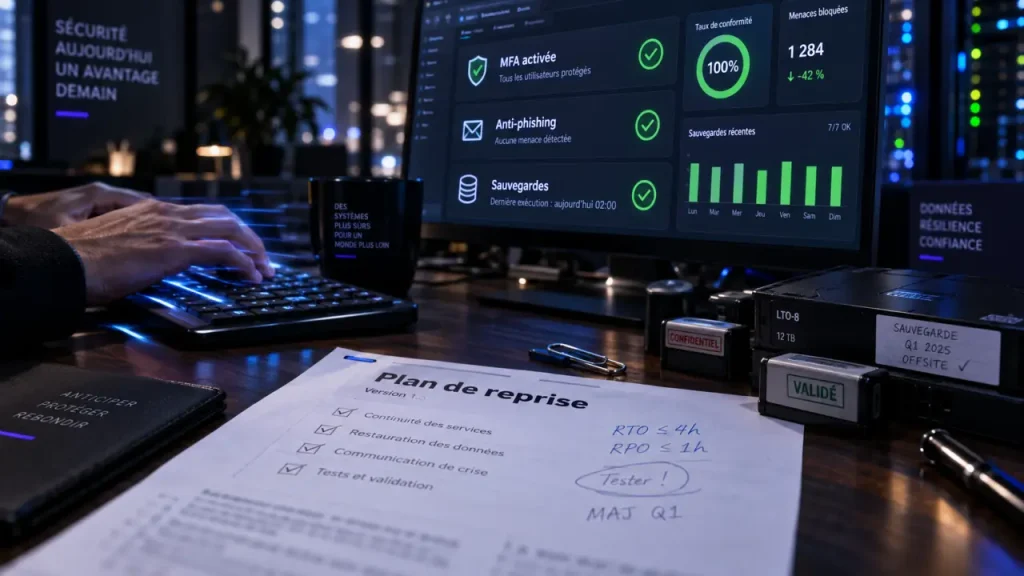
Keeping a business safe online means protecting more than laptops and email accounts. It means preserving access to customer information, financial records, cloud tools, staff communications, and the systems that keep work moving. Effective cybersecurity combines people, technology, and recovery procedures. No single control stops every threat, but several practical layers can reduce disruption and help the business recover.
Start with the risks that can stop work
Small and medium-sized businesses can attract attackers because they may offer an easier route in: a reused password, an unpatched application, an employee who opens a convincing attachment, or an exposed account without multifactor authentication. The result may be stolen data, fraudulent payments, ransomware, lost access to cloud services, or a lengthy interruption to normal operations.
Testez vos connaissances en cybersécurité d’entreprise
Répondez aux 6 questions, puis validez vos réponses pour découvrir votre score et les corrections.
Prioritise the information and services your business could not operate without for even one day. These may include email, accounting, customer records, payment systems, shared files, line-of-business applications, administrator accounts, and employee devices. Assign an owner to each critical system, identify who can access it, and decide what would happen if it became unavailable. This gives the business a clear starting point when time and resources are limited.
Protect the accounts attackers want first
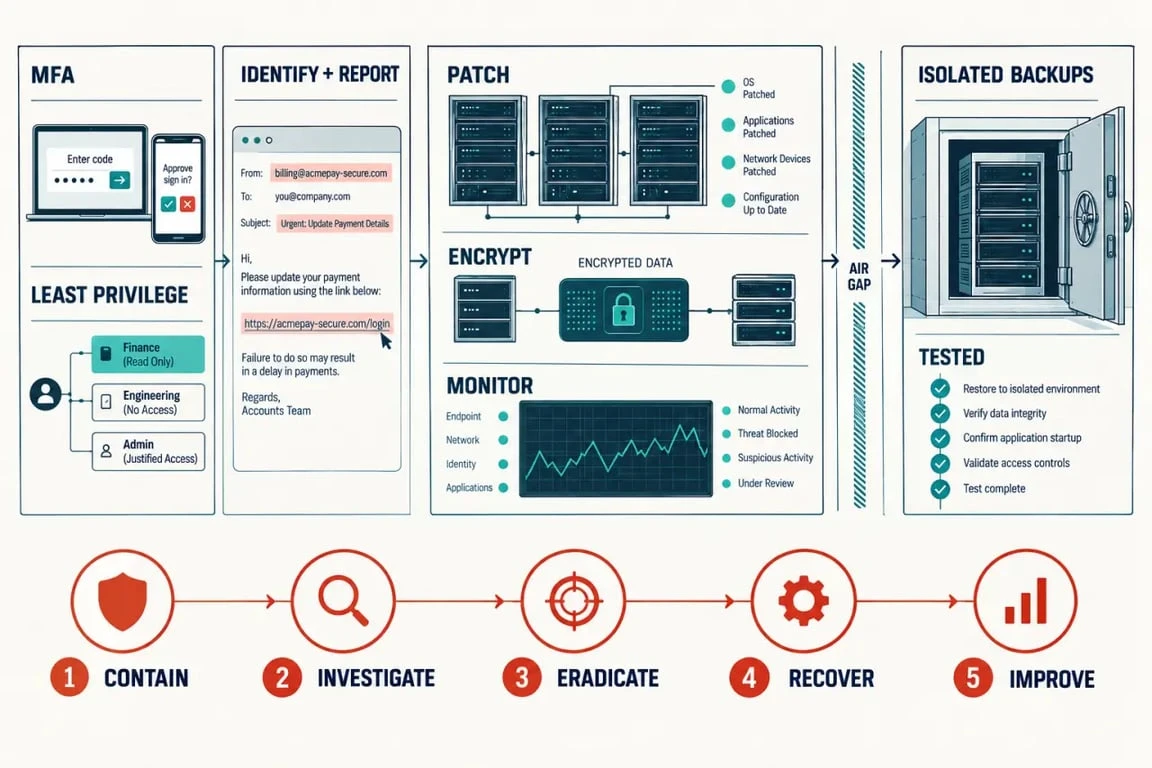
Email, cloud storage, payroll, banking, and administrator accounts need strong protection because they can provide access to many other systems. Require a long, unique password for every account and use a password manager where appropriate. Require multifactor authentication (MFA) on every business account that supports it. MFA, also called two-factor authentication, adds a second proof of identity beyond a password. Where available, choose phishing-resistant MFA.
Do not treat access as permanent. Remove accounts promptly when a person leaves, review privileged access regularly, and give staff only the permissions required for their role. This least-privilege approach limits the damage if an account is compromised and makes unusual access easier to identify.
Make phishing resistance part of everyday work
Phishing tries to persuade someone to reveal credentials, send money, share information, or open malware. Smishing uses the same deception through text messages. A message may look genuine because it copies a supplier’s logo, a manager’s tone, or a familiar invoice format. Staff need a simple process for pausing and checking rather than relying on instinct alone.
Teach people what to inspect before they act
Ask employees to look beyond the sender name. Warning signs include a mismatched email domain, a link that leads somewhere unexpected, a request to bypass normal approval, unfamiliar payment details, an attachment they were not expecting, or urgency designed to prevent verification. Spelling errors can be a clue, but polished language does not make a message safe.
For a payment change, password reset, or request for sensitive information, employees should verify the request through a known phone number, a fresh message to a trusted contact, or an approved internal channel. They should report suspicious emails and texts immediately, even if they did not click anything. A clear reporting process is more useful than blame because quick reporting gives the business time to contain a mistake.
Build a human safety circuit
A well-designed security process works like a fuse in an electrical circuit. It does not need to predict every surge; it needs to break the path before the surge reaches vital equipment. In practice, a staff member can report a suspicious message, an approver can halt an unusual payment, and an administrator can disable a risky account without waiting for certainty. These decision points create containment boundaries and help employees act as an early-warning layer.
Secure the systems that hold and move business data
Good online security is maintained, not installed once. Use a written routine for updates, access reviews, backup checks, and security alerts. The controls below address different failure points and work best when managed together.
NCSC Cybersecurity Guide for Small Organisations · Get practical official advice on backups, device and account protection, and spotting scams to secure your business.
| Control | What it reduces | Practical ownership question |
|---|---|---|
| Security patches and software updates | Known vulnerabilities in operating systems, browsers, applications, and devices | Who checks that critical updates are applied promptly? |
| Logging and monitoring | Undetected sign-ins, unusual activity, and investigation delays | Who reviews alerts and knows when to escalate them? |
| Encryption | Exposure of readable data from lost devices or unauthorised access | Are laptops, mobile devices, and sensitive stored data encrypted? |
| Backups | Permanent data loss and extended ransomware recovery | Can the business restore a usable copy when it matters? |
Apply updates promptly, especially for internet-facing services and software used across the business. Keep security tools current as well. Logging creates an activity trail that can reveal unusual sign-ins, privilege changes, or file activity. Monitoring turns that trail into an action. Someone must know which alerts matter and when to escalate them.
Encryption protects confidentiality by making data unreadable without the appropriate key. It is particularly useful when a laptop or mobile device is lost, or when files are accessed without permission. Review encryption across employee devices, stored business data, and the systems that handle sensitive information.
Back up for recovery, not just for storage
Backups should cover the data required to resume work: documents, databases, email where appropriate, configuration records, and critical cloud information. Set recovery point objectives that define how much recent work the business can afford to lose, then align backup frequency with that decision. Keep copies isolated from everyday systems so a ransomware event cannot easily encrypt or delete every version.
The overlooked step is restoration testing. A backup that merely exists may be incomplete, inaccessible, or too slow to use under pressure. Regularly restore selected files and a meaningful system or dataset in a safe test environment. Record how long the process takes, whether the restored information is usable, and who has authority to begin recovery. A tested backup provides evidence that the recovery plan works, not just an assumption that it will.
Plan the first hours of a cyber incident
When an incident occurs, speed and clarity matter. An incident response plan should state who decides that an event is serious, who contacts IT support or a managed service provider, which systems can be isolated, and who communicates with employees, customers, insurers, legal counsel, or relevant authorities. Keep key contacts available outside the systems that may be affected.
- Contain: Disconnect affected devices or accounts as directed, preserve evidence, and avoid repeatedly rebooting or altering systems without guidance.
- Assess: Identify what happened, which accounts and data may be involved, and which mission-essential functions are at risk.
- Communicate: Give staff clear instructions, use approved communication channels, and ensure external notifications are accurate and appropriate.
- Recover: Restore clean systems and data in a controlled order, reset compromised credentials, and monitor closely for recurring activity.
- Improve: Document the cause, close the gaps found, and update training and procedures.
Business continuity supports incident response. Decide in advance how essential work will continue if email, internet access, a website, storage, equipment, or a core service fails. Offline contact lists, paper-based alternatives for essential tasks, alternative communication methods, and a prioritised recovery order can keep the business functioning while technical recovery is underway. Review and practise the incident response plan at least annually, so staff understand their roles before an emergency.
Use BusinessSafe Online and specialist support with clear accountability
If you are looking for the BusinessSafe Online platform, use the access route provided by Peninsula and follow your organisation’s account procedures. BusinessSafe Online automatically disconnects from the server after 15 minutes following the last keystroke, with a reminder appearing after 10 minutes of inactivity. A platform can support security administration, but it does not remove the need for defined internal responsibilities. Someone must own access decisions, employee reporting, supplier verification, recovery testing, and incident escalation.
Managed IT or cybersecurity support is valuable when internal teams cannot continuously patch systems, review logs, manage backups, respond to alerts, or maintain a practical security roadmap. Before engaging a provider, clarify which systems they monitor, how incidents are escalated, who performs restores, what response times apply, and what your business remains responsible for. The arrangement should make security work visible, with clear ownership and regular updates.
Begin with the controls that close the largest gaps: MFA for critical accounts, prompt patching, employee phishing reporting, protected backups, and a tested response plan. Then review them regularly. This steady approach protects customer trust and gives the business a credible path back to normal when something goes wrong.

- Business Safe Online: Secure Access, Test Recovery, Limit Downtime - 22 September 2026
- Glass Business Software: Turn Vendor Quotes into Profitable Installed Jobs - 12 September 2026
- Data-Driven Email Marketing Turns Customer Signals into Better Timing and Conversions - 11 September 2026