
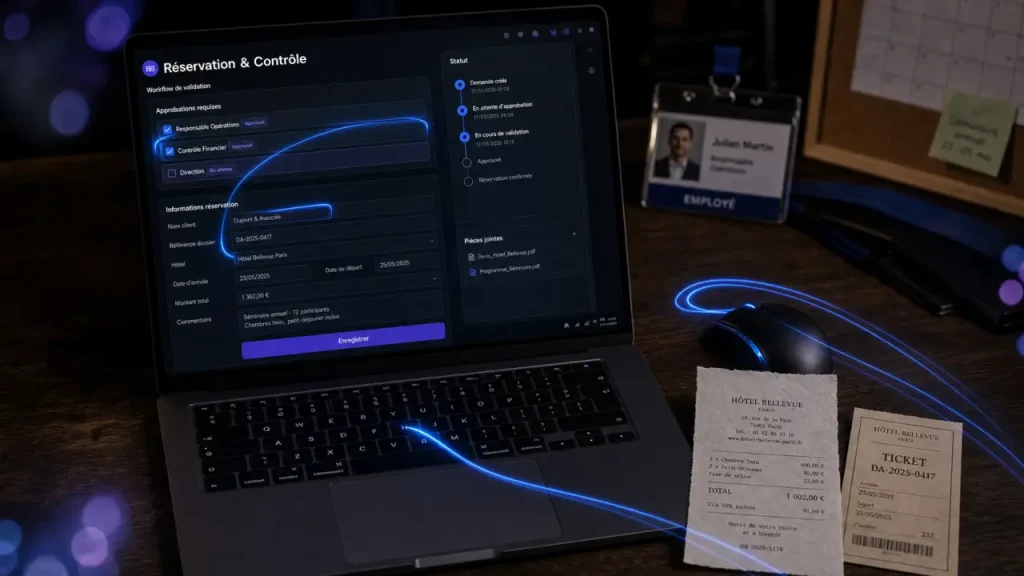
Business travel software is no longer just a booking portal. For many companies, it now sits between employees who need to move quickly and finance teams that need policy compliance, clean data, and predictable spend. The right platform centralizes booking, approvals, expenses, reporting, and audit trails so travel does not get lost in emails, spreadsheets, and delayed reimbursements.
If you are shortlisting vendors, the real question is not “which tool has the most features?” It is which platform will reduce manual work, make compliant booking easier, and give your company enough visibility to act before costs drift.
What a business travel platform should actually centralize
A strong business travel management software platform brings together the pieces that often sit in separate systems: flight and hotel search, employee profiles, company travel policy, approval workflow, payment, receipts, expense management, and reporting. This matters because fragmented travel creates hidden work. Someone books outside policy, someone else checks the receipt, finance chases missing data, and managers approve costs without seeing the budget impact. Centralization reduces that back and forth.
Booking with guardrails, not just booking access
Self-booking is valuable only if employees see the right options at the right time. A good platform should make in-policy hotels, flights, rail, and car rental easy to identify, while flagging or routing exceptions before money is committed. This is where policy enforcement becomes practical: budget limits, preferred suppliers, refundable rates, class-of-service rules, and approval thresholds are embedded into the booking path.
The employee experience matters here. If the software feels slower than a consumer travel site, travelers will work around it. If it gives them a familiar search experience with clear guardrails, adoption improves and finance gets cleaner data from the start.
Approvals that reflect how your company really works
Approval workflow should not be a single “manager says yes” step. Different trips may need different logic: department budget owner, project code, destination risk, seniority level, client billability, or last-minute booking. The best systems let companies configure these rules without turning every trip into a ticket for the finance team.
Use the platform to guide travel decisions before booking. It should show the acceptable route based on budget, policy, duty of care, and timing. When rules are visible early, employees can adjust their choices without escalation. That keeps travel moving and cuts the number of exceptions that later slow down reimbursements and create disputes.
The features that separate useful software from a prettier spreadsheet
Most vendors promise automation and savings, but buyers should look at how those promises are delivered. A platform can have a modern interface and still leave finance with manual reconciliation, weak reporting, or poor integration with accounting systems. The difference is in the workflow, not the sales page.
IRS Guide to Deducting Travel, Gift, and Car Expenses · Learn which business expenses are tax-deductible and how to properly document them for your tax return.
| Capability | Why it matters | What to check before buying |
|---|---|---|
| Centralized booking | Keeps travel data, supplier choices, and employee itineraries in one place. | Does it support the travel types your teams actually use: hotels, flights, rail, cars, group travel, crew travel, or events? |
| Policy enforcement | Reduces out-of-policy spend before it happens. | Can rules vary by role, department, route, project, or trip purpose? |
| Expense management | Connects receipts, card payments, reimbursement, and accounting. | Does it reduce missing receipts and duplicate data entry? |
| Approval workflow | Prevents bottlenecks and creates an audit trail. | Can approvals be automated for low-risk trips and escalated for exceptions? |
| Reporting and spend visibility | Helps finance monitor travel during the year, not only after month-end close. | Can you see spend by traveler, team, supplier, project, and policy exception? |
| Integrations | Connects travel to the wider finance and operations stack. | Does it integrate with ERP, accounting, HRIS, SSO, procurement, and corporate cards? |
Travel and expense should work together
Travel and expense management are often evaluated together because the cost does not end when the booking is made. A hotel charge, meal receipt, mileage claim, cancellation, or modification fee still needs to be reconciled. When booking and expense data live in the same workflow, finance teams can compare what was approved, what was booked, and what was finally paid.
This is especially useful for audit readiness. Instead of reconstructing decisions from email chains, the system keeps a record of who booked, who approved, whether the trip was in policy, which payment method was used, and which receipt supported the expense. That reduces time spent checking details at month-end.
Where the ROI usually appears first
Return on investment often starts with time saved, but it becomes more persuasive when it reaches avoided fees, better rates, and fewer unused bookings. Vendor claims in this market show the scale buyers are looking for: one Navan customer testimonial describes the process as “100 times easier” and attributes 15% estimated cost savings to the platform. Engine presents trust indicators including 20k+ businesses and positions itself as a #1 platform, while also highlighting examples such as $60K saved in 6 months, $500K saved in modification fees, and $232M saved on unused rooms with FlexPro.
These figures should not be treated as automatic results for every company. They are useful because they show where value can be created: fewer unused rooms, fewer modification fees, faster booking, tighter approval control, and better supplier visibility.
Time savings are not just an admin benefit
Manual travel work steals time from finance, operations, executive assistants, project managers, and travelers. Engine highlights cases such as booking 3-4 hotels in the time previously required to book one, 50-70 hours saved per booking for conferences and events, and roughly two hours for conference and event booking. It also cites a disaster relief use case with an approximate booking time of 30 minutes.
For travel-heavy teams, that time saving changes capacity planning. The person who used to chase confirmations and invoices can focus on vendor negotiation, traveler support, or budget analysis. The gain is operational, not only administrative.
Savings need to be measurable inside the platform
Claims such as 26% average travel savings, $44,700 in potential savings for construction crews, $191K saved in modification fees, $87K saved on billing or operational savings, 40 hrs saved per week, up to 10% on travel with Engine X Card, and 1.5% on everything else with Engine X Card are meaningful only if your own platform can track comparable outcomes.
Before signing, ask whether the system can show baseline spend, policy exceptions, average booking lead time, unused inventory, modification charges, and realized savings. Without measurement, “savings” remains a sales promise rather than a management metric.
Which teams need business travel software most
The need becomes obvious when travel volume, complexity, or compliance pressure increases. A small company with occasional trips may manage with cards and expense tools for a while. But once multiple departments travel, budgets split across projects, or approval chains become inconsistent, centralization becomes more valuable.
Finance, procurement, and CFO teams
Finance teams care about spend visibility, reconciliation, budget control, and clean reporting. Procurement teams care about supplier consolidation, negotiated rates, and contract compliance. CFOs care about forecasting and risk: travel spend should be visible during the year, not discovered after invoices and reimbursements have already landed.
For these buyers, the platform should support spend tracking, audit trails, approval governance, and integrations with the financial system of record. Pricing transparency also matters: ask whether fees are per user, per trip, per booking, subscription-based, card-linked, or bundled into service charges.
Operations, events, crews, and public-sector buyers
Not all business travel is standard corporate travel. Construction crews may need recurring hotel blocks. Conferences and events teams may coordinate many travelers at once. Public-sector buyers may need specific rate controls such as GSA rate hotels. Disaster relief, field service, healthcare, entertainment, and project-based teams often need rapid changes, group bookings, and clear visibility into unused rooms.
These teams should test whether the software handles real scenarios, not just polished demos. Can it modify bookings quickly? Can it prevent waste when schedules change? Can it separate costs by project, location, crew, or event? Can managers see who is traveling and where?
How to choose without being distracted by feature lists
Shortlisting business travel software is easier when you score vendors against your workflow rather than against a generic checklist. Start with the moments where your current process fails: booking delays, out-of-policy travel, missing receipts, unclear approvals, unused rooms, modification fees, or weak reporting. Then ask each vendor to demonstrate those exact scenarios.
- Map your travel flow: request, search, approval, booking, payment, receipt, reimbursement, reconciliation, and reporting.
- Define policy rules: spending caps, preferred suppliers, advance booking windows, approval thresholds, and exception handling.
- Test employee adoption: mobile access, search quality, profile management, traveler support, and consumer-grade UX.
- Check finance controls: audit trail, real-time reporting, cost centers, project codes, card feeds, and month-end close support.
- Validate integrations: ERP, accounting, HRIS, SSO, procurement, expense tools, and corporate cards.
- Interrogate pricing: subscription, transaction fees, implementation costs, support fees, cancellation terms, and card economics.
Implementation should also be part of the buying decision. Ask how policies are configured, whether historical data can be migrated, how traveler profiles are loaded, who trains employees, and what support looks like during rollout. A platform that is powerful but difficult to deploy may delay the very savings it promises.
The strongest choice is usually the one that balances three priorities: travelers can book without frustration, managers can approve without bottlenecks, and finance can see spend without reconstructing the story afterward. When those three conditions are met, business travel software becomes more than a booking tool, it becomes a practical system for travel orchestration, compliance, and cost control.