

Microsoft Dynamics 365 Business Central is cloud-based financial management and ERP software. It handles day-to-day accounting while connecting finance to the operational events that create financial consequences, including customer orders, supplier purchases, stock movements, projects, and fixed assets.
That connection is the main difference from a traditional accounting package. Basic software may record an invoice after someone creates it elsewhere. Business Central can link the accounting record to the related business process, reducing duplicate entry and giving finance teams more timely information. For a growing small or midsized business, it offers a route from bookkeeping-focused software to a connected management system.
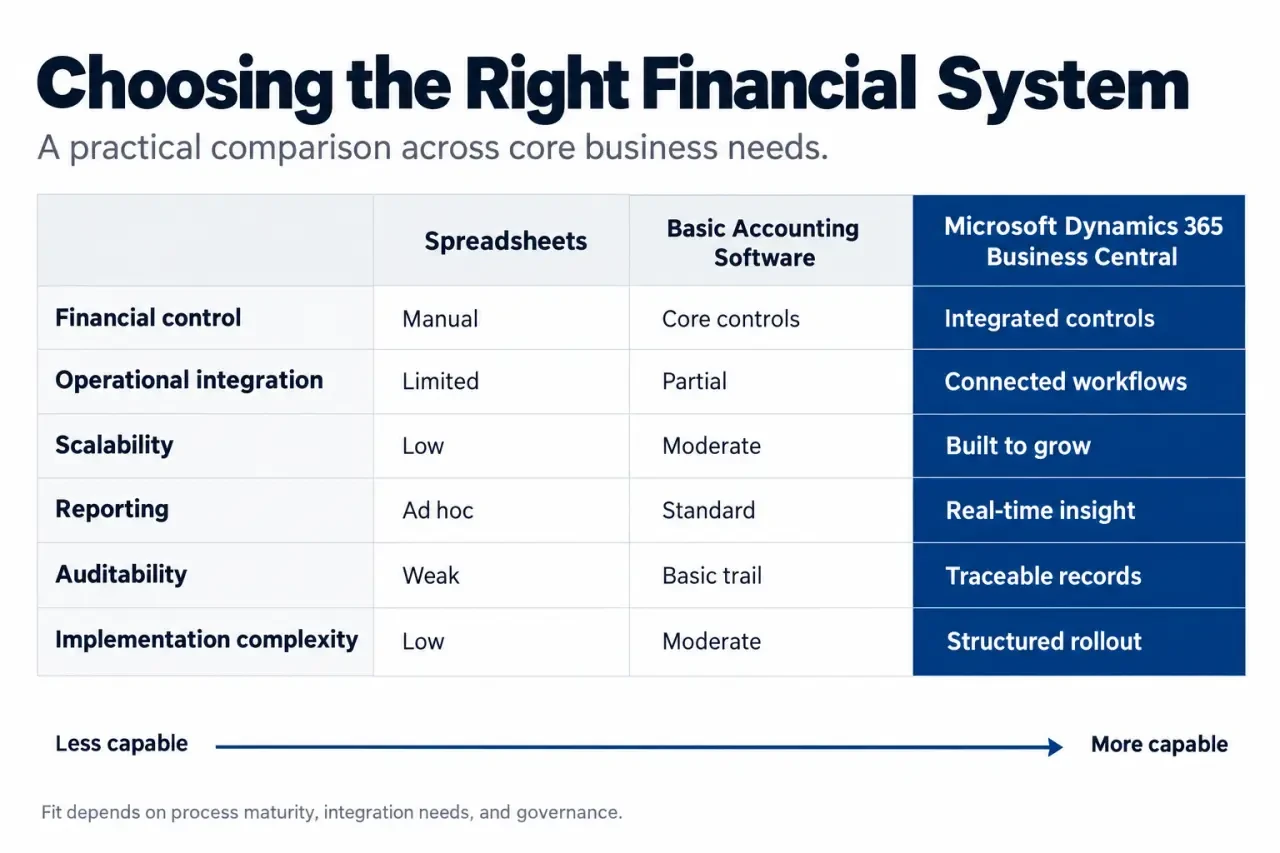
Where Business Central fits between accounting software and ERP
When the move becomes worth evaluating
Business Central is worth evaluating when the finance team spends too much time consolidating exports, reconciling separate systems, correcting manual entries, or explaining why reports are already out of date. It can also suit a business that needs more users, additional legal entities, multiple currencies, stronger approval controls, or reporting by department, project, region, product, or cost centre.
It is not automatically the right choice for every small company. An organization with simple transactions, no inventory, limited reporting needs, and a stable workflow may find basic accounting software sufficient. The case for Business Central becomes stronger when financial control must keep pace with operational complexity.
| Approach | Best for | Typical limitation |
|---|---|---|
| Spreadsheets | Ad hoc analysis and small data sets | Version control, manual updates, and weak auditability |
| Basic accounting software | Core bookkeeping and straightforward invoicing | Limited links to inventory, purchasing, and operational reporting |
| Business Central | Growing businesses that need accounting and connected ERP processes | Requires structured implementation, training, and governance |
The financial workflows finance teams can centralize
The core of Business Central accounting software is the general ledger, supported by a configurable chart of accounts and multidimensional accounting. Dimensions let teams classify entries beyond the account code, such as by branch, customer group, project, department, or product line. This gives a controller more useful analysis than a single ledger account can provide.
Master Financial Management with Business Central · Discover how Business Central supports financial management, accounting, auditing, and bookkeeping.
Payables, receivables, and cash visibility
Accounts payable supports vendor invoices, payment tracking, and approval workflows. Accounts receivable supports customer invoicing, collections, aging reports, and payment follow-up. Bank statement reconciliation helps match bank activity to ledger balances, while cash management and cash flow forecasting help finance teams assess liquidity instead of relying only on a historical bank balance.
The practical advantage is continuity. A payment status, overdue receivable, or approved invoice should not require someone to rebuild the story across email, a spreadsheet, and a separate accounting application. Clear processes still matter, but the system can make them visible and repeatable.
Assets, budgets, tax, and international operations
Business Central can manage the fixed asset lifecycle, including acquisition, depreciation, maintenance, disposal, valuation, and write-downs. Finance teams can create budgets, compare budget-to-actual results, investigate variances, and use forecasting or scenario modeling to test planning assumptions.
It also supports configurable tax rules and rates, tax reporting processes, multicurrency transactions, exchange-rate updates, revaluation, gains and losses, and financial consolidation. The exact tax, statutory reporting, and localization requirements should be reviewed for each jurisdiction rather than assumed during selection.
Why connected data changes the quality of financial decisions
Automation is useful when it removes repetition without obscuring accountability. Automated transaction posting, approval workflows, reconciliation support, and recurring processes can reduce manual handling. Copilot can assist with bank reconciliation, insight generation, narrative drafting, and repetitive work, but finance leaders should retain review procedures and clear ownership of exceptions.
A useful way to assess the platform is to examine the rhythm of a close process. Transactions arrive, approvals happen, bank movements settle, accruals are reviewed, and management asks questions. When each stage lives in a separate file or application, month-end becomes a scramble to reconnect them. When ledger entries, operational documents, dimensions, and reporting share a common cadence, teams can identify an exception while it is still actionable, not only after the reporting deadline.
Reporting that starts with the underlying transaction
Business Central supports financial statements such as profit and loss statements, balance sheets, and cash flow statements, along with dashboards, Excel export, and Power BI analytics. A polished dashboard is not enough. Finance teams should be able to trace a figure back to its transactions, filter it by relevant dimensions, and explain the variance without creating another offline workbook.
Integration with Microsoft 365, Excel, Outlook, and Power BI can also improve collaboration. Finance users can work with familiar productivity tools while maintaining a more consistent financial data foundation. Connections to sales, purchasing, inventory, supply chain, and operations help prevent the finance function from becoming a reporting bottleneck.
Controls that support audit readiness without slowing work
A stronger system does not remove the need for internal controls. It makes them easier to apply consistently. Business Central provides transaction history, user activity, timestamps, reason codes, audit trails, and role-based permissions. These capabilities support accountability and can help separate duties so that one person does not initiate, approve, and reconcile the same activity.
Before implementation, define who can create vendors, release payments, post journals, adjust dimensions, approve documents, and access sensitive reports. Permissions should reflect actual job responsibilities, not merely titles. This design work often matters more than adding a large number of custom fields or workflows.
How to implement Business Central without carrying old problems forward
A successful rollout begins with decisions about finance processes, not with a rushed import of legacy data. A Microsoft partner can be useful when requirements include complex integrations, multiple entities, specialized reporting, or process redesign. The three main implementation cost drivers are the number of users, required customizations, and integration complexity. Migration scope, training, and ongoing support should also be assessed early.
- Map requirements and controls. Document the chart of accounts, dimensions, approval paths, tax settings, reporting needs, and segregation of duties.
- Clean data before migration. Review customer, vendor, item, opening balance, and fixed asset records. Remove duplicates and assign ownership for data corrections.
- Configure standard processes first. Keep the initial design close to standard capabilities where possible. Confirm which requirements need extensions or customization.
- Test realistic scenarios. Include invoices, payments, bank reconciliation, month-end journals, depreciation, budgets, multicurrency activity, and report review in user acceptance testing.
- Train by role and plan the launch. Users need practice with their own tasks, exception handling, and approval responsibilities.
- Monitor the first close after go-live. Prioritize fixes according to their effect on controls and business operations, then refine processes as users gain experience.
Business Central is a credible choice for organizations that need accounting software to become a connected financial management foundation. The right next step is a focused requirements review. Identify the reporting gaps, operational handoffs, control weaknesses, and growth plans that the platform must address before committing to configuration or customization.

- Business Central Accounting Software Connects Finance to the Operations Behind the Numbers - 20 October 2026
- Influencer Marketing Measurement Needs More Than Likes: ROI, Sales Lift, and Attribution - 18 October 2026
- Business License Management Software: How to Replace Spreadsheet Chaos With a Real Renewal Workflow - 13 October 2026